



Gemini Gets Temporary Chats & Personalized Features
A Better Way to Chat with Gemini. Google’s Gemini just got a big upgrade with some features that give you more control over your conversations.
They’ve added something called “Temporary Chats” and also given you new ways to personalize how Gemini talks to you.
These changes are all about making your experience feel more personal and secure. Let’s take a closer look at what these new updates can do for you.

Temporary Chats for More Privacy
The biggest new feature is Temporary Chats, which is great for anyone who values their privacy. It lets you have a conversation with Gemini that doesn’t get saved to your chat history.
That means you can talk about sensitive things or just ask a quick question without a permanent record of the chat. When you start a Temporary Chat, everything you say and everything Gemini says disappears once you close the window or the session ends. It’s a simple way to get what you need from Gemini without leaving a trace.
Making Gemini More Your Own
On top of the temporary chats, Gemini now lets you customize your conversations even more. These new personalization features give you the power to influence how Gemini responds. While we don’t have all the details yet, Google’s announcement hints that you’ll be able to change things like:
- How long the responses are: Choose if you want short, to-the-point answers or more detailed explanations.
- The tone of the conversation: You might be able to pick a style that’s more formal, casual, or creative.
- What kind of information does it use? You could tell it what types of sources you prefer.
These new options mean you’ll get more relevant answers that are better suited to what you’re looking for. It’s about making your interactions with Gemini more efficient and enjoyable. These new updates show that Google is listening to user feedback.
Temporary Chats and the new personalization tools are a great step toward giving you more control over your conversations with Gemini, making it a more personal and private experience.
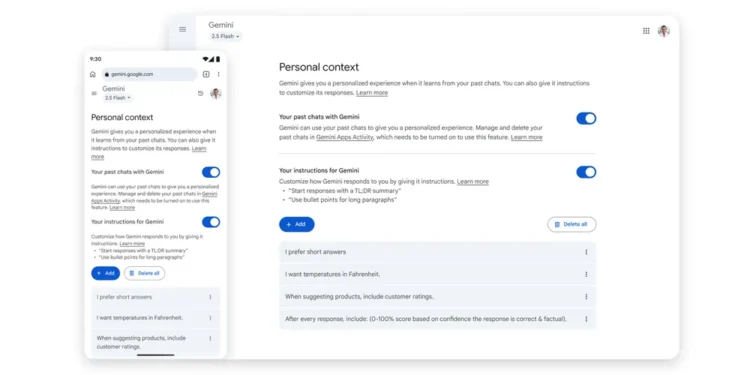
Gemini Now Uses Your Past Chats for More Personal Answers
At our I/O event, we shared our goal for the Gemini app: to create an AI assistant that truly gets you, not one that gives everyone the same generic response. Now, we’re taking a big step toward that goal.
We’re rolling out a new setting that allows Gemini to learn from your past conversations. When you turn this on, Gemini will remember important details and preferences you’ve shared. This leads to more natural, relevant conversations, making it feel like you’re talking to someone who already knows what you’re interested in.
Here are a few examples of how this new feature can make a difference:
- You love comic books: If you’ve previously talked about your favorite comic book characters, and you then ask Gemini for a birthday party theme, it might suggest a celebration based on that character—complete with themed food and a custom photo booth.
- You’re a reader: If you’ve used Gemini to get summaries of popular non-fiction books, the next time you ask for a book recommendation, it might suggest books with similar themes and even give you quotes for your social media posts.
- You’re a content creator: If you’ve brainstormed ideas for a YouTube channel about Japanese culture, and you later ask for “new content ideas,” Gemini might suggest a video theme like “My First Time Trying…” where you film yourself trying a new Japanese food or a traditional craft.
You’re in Control
This feature is being rolled out over the next few weeks, starting today. It will first be available with our 2.5 Pro model in select countries, with plans to expand to the 2.5 Flash model and more countries soon.
The setting is on by default to help Gemini give you the best responses, but you can turn it off or on whenever you want. Just go to your Settings in the Gemini app, select “Personal context,” and then “Your past chats with Gemini.” As always, you can also manage and delete your conversations in your Gemini Apps Activity.
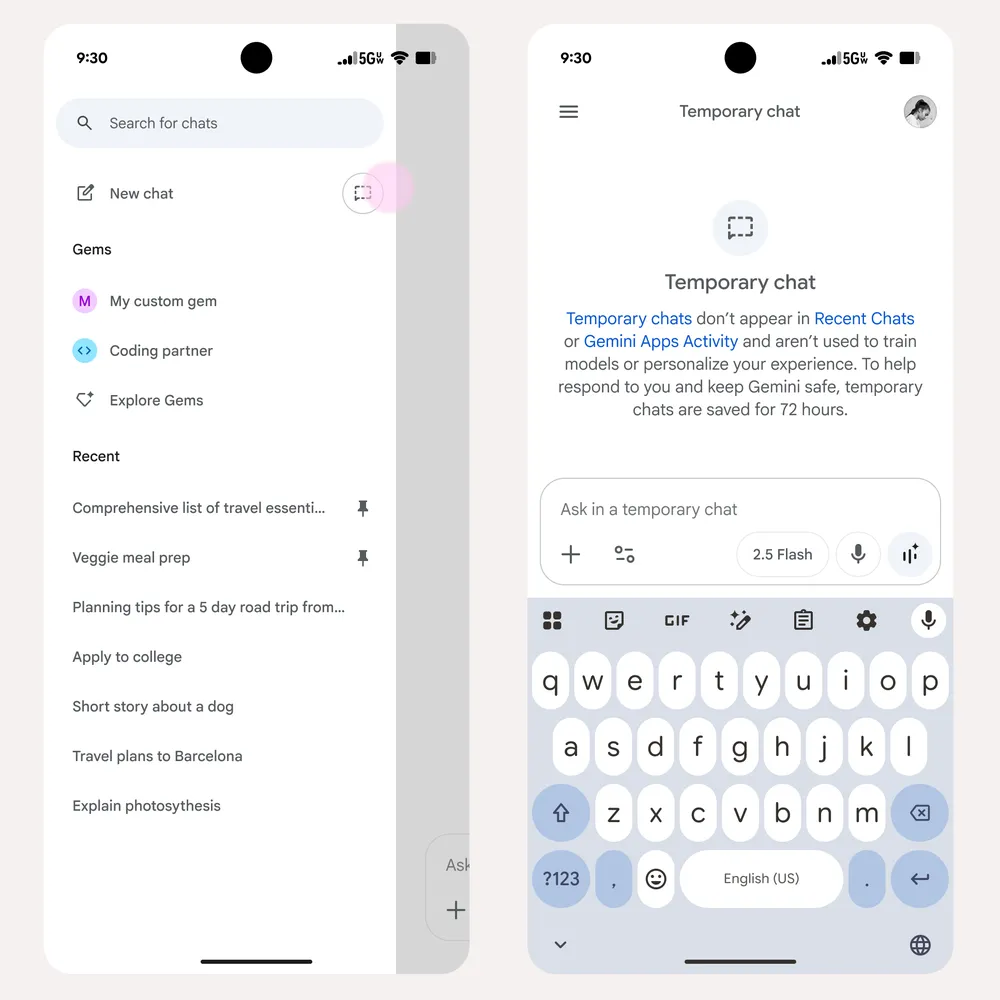
Get Quick, Private Answers with Temporary Chat
Sometimes, you need to ask a quick question or brainstorm an idea without it affecting your future chats. Maybe you have a private question you don’t want saved, or you’re exploring a topic that’s not part of your usual interests.
For these moments, we’re launching a new feature called Temporary Chat. It’s rolling out now and will be available to all users in the coming weeks.
Conversations in Temporary Chat won’t show up in your recent chats or your Gemini Apps Activity. They also won’t be used to personalize your experience or train our AI models.
These chats are saved for up to 72 hours, just long enough to respond to you and process any feedback you provide.
You’re in Control of Your Gemini Data
We’re always working to make the Gemini app a better, more helpful assistant. As part of this effort, we’re changing how we handle the files and photos you upload.
In the next few weeks, your “Gemini Apps Activity” setting will be renamed “Keep Activity.” When this setting is on, a sample of your future uploads will be used to help improve Google’s services for everyone. If you’d rather not have your data used this way, you can easily turn this setting off or use Temporary Chats for private conversations.
If your Gemini Apps Activity setting is currently off, the new Keep Activity setting will stay off, but you can turn it on whenever you like.
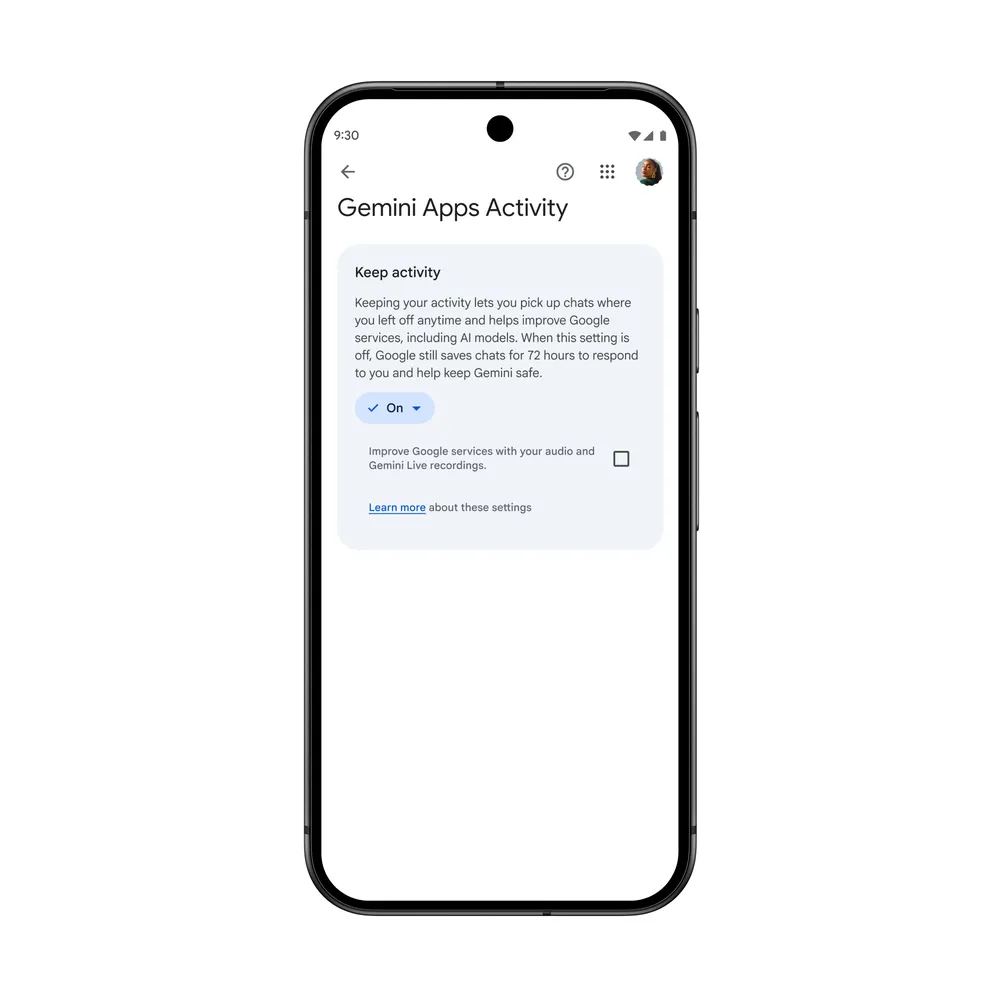
New Privacy Options for Audio and Video
Earlier this month, we also added a new control that lets you decide if the audio, video, and screen shares you provide to Gemini are used to improve our services. This setting is off by default, but you can turn it on anytime you want. You can find more details about this in the Gemini Apps Privacy Hub.
Since trust comes from being open and in control, we want to give you the tools to manage your data. You can change these settings whenever you want and learn more about how Google handles your data in our Gemini Apps Privacy Hub.